
How to write a three-shot MAGI-2 video prompt
On MAGI 2 AI, plan a 12-second MAGI-2 lighthouse film as three timed shots. Copy the prompt, compare one continuous take, and review the cuts.
On this page
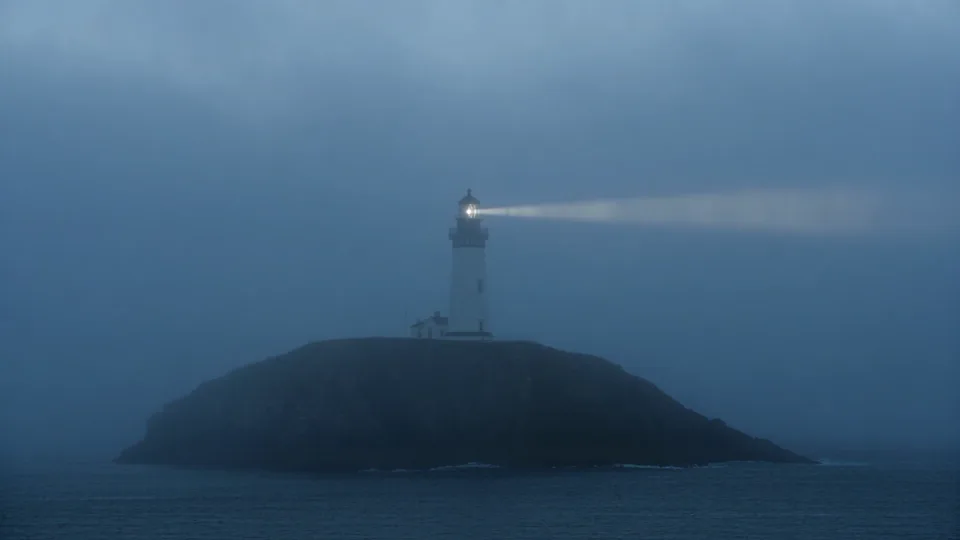
A shot change earns its place when it reveals something the last shot couldn't show. For this 12-second lighthouse scene, a wide shot tells us where we are, a close-up reveals what makes the beam move, and a return to the coast lets us see the sunlight arrive. Give each shot one line in the prompt. On the MAGI-2 homepage, watch how a cut changes the scale of a shot before writing your own.
Plan the three shots
| Time | Framing | What the viewer should see |
|---|---|---|
| 0–4 s | Wide, from across the bay | A lighthouse on a foggy headland. Its beam is just visible in the mist. |
| 4–8 s | Cut to a close-up | The ridged glass of the rotating lens fills the frame. |
| 8–12 s | Cut back to the opening wide view | Sunlight reaches the fog around the lighthouse. |
The words cut to ask for a new viewpoint. Cut back to the opening wide view gives the final shot a specific place to return to. Time ranges communicate the rhythm you want. Check the actual cut positions during playback, particularly if the clip has to fit an edit.
Copy the three-shot prompt
Open the generator, select MAGI-2, leave the references empty, and set the output to 12 seconds and 16:9. Switch Generate audio off for this visual exercise. The duration setting controls the clip length. The time ranges inside the prompt describe how to spend those seconds on the MAGI-2 homepage.
Prompt
A 12-second coastal lighthouse film at sunrise, in 16:9. Keep the same white lighthouse with a black lantern roof, the same rocky headland and the same low sea fog throughout. Use exactly three shots with straight cuts. 0–4 seconds: A locked wide shot from across the bay. The lighthouse stands on the headland in blue-grey fog. A thin beam sweeps through the mist. 4–8 seconds: Cut to a close-up inside the lantern room. The glass Fresnel lens rotates slowly past the camera. Hold the framing on the ridges of the glass. 8–12 seconds: Cut back to the original wide view across the bay. The first warm sunlight catches the fog around the lighthouse. Hold on the headland to the end.
Where the cuts landed in this sample
We requested 12 seconds. The 1920 × 1080 file runs 12.24 seconds at 25 frames per second. The first cut landed at 4.00 seconds. The second came at 7.84 seconds, four frames ahead of the requested 8-second mark. All three requested views appear in order. If you need the return to the coast to coincide with a sound cue, use the cut in the generated clip when you place that cue in your editor.
Try the same location in one continuous take
Keep the duration and aspect ratio. This time, put the camera somewhere it can see both the glass and the coast without jumping between the headland and the lantern room. Start beside the lens and move sideways to reveal the view through the window.
Prompt
One continuous 12-second shot inside the lantern room of a white coastal lighthouse at sunrise, in 16:9. Begin close to the slowly rotating glass Fresnel lens, its ridges catching a faint amber beam. Glide sideways in a single smooth move until the window frame enters view. Keep part of the lens at the left edge as the rocky headland and low sea fog appear through the glass. Warm sunlight spreads across the mist. Ease to a stop and hold the view. Keep the camera inside the lantern room throughout, with no cuts.
If you have a clip of the sideways move you want, upload it as a motion reference and describe what the new camera should follow on the MAGI-2 homepage.
Review a result and revise one line
- Watch the first cut. Does the lens appear in a new shot, or does the camera travel from the bay into the tower? If it travels, simplify the middle line to “Hard cut to a stationary close-up of the rotating glass lens.”
- Pause on the opening and closing views. Compare the headland's outline and the tower's position. For a closer match, describe the same landmark in both lines, such as “the tower on the left third of the frame.”
- Check the timing in your editor. Note when the lens first fills the frame and when the coast returns. If a cut must land on a particular beat, trim the shots in the edit.
When you already have an exact opening image and an intended ending image, give those frames directly to the generator on the MAGI-2 homepage.